
Winning the job is one part of the workflow. Your office still needs the customer's information, the equipment they chose, and the agreed price to get the work scheduled.
SetSale's Housecall Pro integration connects those steps. Build and present the proposal in SetSale, then carry the sold quote into Housecall Pro so your team can continue managing the installation.
Start with the right customer
Connected teams can use Housecall Pro customer information while building a SetSale quote. That gives the salesperson a way to work from an existing customer record rather than re-entering the contact and service address for each proposal.
Build the options and present them using SetSale's homeowner experience. The integration keeps that sales workflow connected to the system your office already uses for jobs.
Turn the sold quote into an unscheduled job
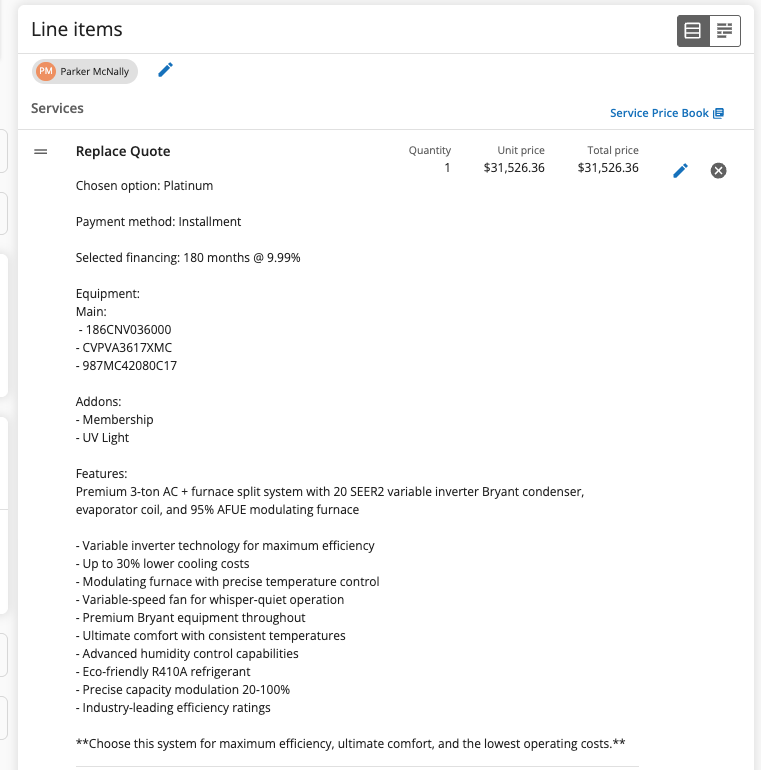
When the quote is marked Sold in SetSale, the integration sends it to Housecall Pro as an unscheduled job. The documented handoff includes the total quote price, equipment, and selected add-ons and features in the job description.
The screenshot above illustrates the handoff in the current help guide, rather than the launch-day interface. Review the resulting job with your office, then schedule the installation, accept payment, and manage the work through your normal Housecall Pro process.
For the team, this creates a practical division of work: the salesperson prepares the proposal and secures the decision in SetSale; the office continues from the job record in Housecall Pro. The goal is to reduce the manual reconstruction between those steps and make the agreed scope easier to review.
Built on an integration released in May 2025
The original Housecall Pro integration merged in May 2025. It connected customer lookup and quote information with the integration settings needed to link the accounts.
The connection has continued to develop. The September 2026 release notes document richer job syncs, including accepted services and complete warranty details. Those later improvements add context to the handoff; they are separate from the original release.
Connect the accounts and review the handoff
Your account needs Housecall Pro API access. Follow the connection guide with your administrator to confirm eligibility and set up the integration.
Then review a sold quote in both systems. Check the customer, service address, equipment, and total before the office continues the job. That shared review gives the team a clear process for moving from the homeowner's decision to the scheduled work.